

Keeping the packets flowing.
Saturday, January 10, 2015
Choosing an ExtremeXOS Software Release
When updating ExtremeXOS, it is important to choose your software release carefully. The newest builds may contain new features that are not yet stable. I learned this the hard way. The Extreme support portal currently does not label their software builds with anything that indicates what is a stable build and what is may contain new unstable features.
Thursday, January 8, 2015
Extreme Networks EXOS Cheat Sheet
After working in primarily Cisco or Cisco-esque CLIs, ExtremeXOS can have a bit of a learning curve. At the time of this post, Extreme Networks' documentation is almost entirely in PDFs. In my opinion, these are a bit of a pain to navigate and are not well indexed by search engines.
This post is meant to serve as a basic EXOS cheat sheet. It is by no means meant to be a configuration guide or thorough command reference. I will update this post periodically to add additional commands.
update: I reached out to Extreme regarding their documentation (I work for a partner), and it turns out they already have an EXOS cheat sheet, so my channel SE sent it over. I was not able to find this document anywhere on Extreme's site. However, an Extreme SE confirmed this document is public, so here it is: EXOS Quick Guide - Cheat Sheet. I may still update this page on occasion, but Extreme's document is more complete.

This post is meant to serve as a basic EXOS cheat sheet. It is by no means meant to be a configuration guide or thorough command reference. I will update this post periodically to add additional commands.
update: I reached out to Extreme regarding their documentation (I work for a partner), and it turns out they already have an EXOS cheat sheet, so my channel SE sent it over. I was not able to find this document anywhere on Extreme's site. However, an Extreme SE confirmed this document is public, so here it is: EXOS Quick Guide - Cheat Sheet. I may still update this page on occasion, but Extreme's document is more complete.
Monday, January 5, 2015
HOWTO: Basic Cisco ASA AnyConnect VPN 8.2(5)
A while back I posted a how-to for configuring AnyConnect in ASA version 8.3+. I recently received a request to post the 8.2(5) configuration, so here it is. The example below uses split tunneling and local authentication. For RADIUS authentication, see this post.

Before beginning, verify you have the AnyConnect essentials license (without this license, only two simultaneous sessions are permitted).

Before beginning, verify you have the AnyConnect essentials license (without this license, only two simultaneous sessions are permitted).
asa# sh ver | inc AnyConnect
AnyConnect Premium Peers          : 25             perpetual
AnyConnect Essentials             : 25             perpetual
AnyConnect for Mobile             : Enabled        perpetual
AnyConnect for Cisco VPN Phone    : Enabled        perpetual
asa#
Saturday, December 27, 2014
HOWTO: Cisco ASA AnyConnect RADIUS Authentication with NPS
Following up on my previous AnyConnect how-to, this post shows how to configure a Cisco ASA to authenticate against a Windows Network Policy Server (NPS) using RADIUS.
First, configure a aaa-server group with the radius protocol.

First, configure a aaa-server group with the radius protocol.
asa01(config)# aaa-server RADIUS protocol radius
asa01(config-aaa-server-group)# exit
asa01(config)#asa01(config)# aaa-server RADIUS (inside) host 10.24.12.2
asa01(config-aaa-server-host)# key pr3-shar3d-k3y
asa01(config-aaa-server-host)# exit
asa01(config)#
Wednesday, April 30, 2014
HOWTO: Basic Cisco ASA AnyConnect VPN 8.3+
This is a brief how-to style guide for configuring an AnyConnect remote access VPN on an ASA running version 8.3(1) or greater. The example below uses split tunneling and local authentication. RADIUS authentication will be covered in a future post. (update: see here)
Before beginning, verify you have the AnyConnect essentials license (without this license, only two simultaneous sessions are permitted).
Before beginning, verify you have the AnyConnect essentials license (without this license, only two simultaneous sessions are permitted).
asa# sh ver | inc AnyConnect
AnyConnect Premium Peers          : 25             perpetual
AnyConnect Essentials             : 25             perpetual
AnyConnect for Mobile             : Enabled        perpetual
AnyConnect for Cisco VPN Phone    : Enabled        perpetual
asa#
Monday, March 24, 2014
ASA pre-8.3 vs post-8.3 NAT explained
In ASA software version 8.3(1), Cisco completely restructured ASA NAT syntax. Quite a bit has already been written about these changes. However, since this is often a cause of confusion, I will try to provide an explanation of three of the most commonly used forms of NAT on an ASA: dynamic PAT, static NAT, and "nonat." Below you'll find pre-8.3 and post-8.3 configuration examples with translations into into plain English. Please feel free to comment if you have any questions.
I'll start with the basics. NAT stands for network address translation. It translates the real IP address of a device to the mapped IP and vice versa.
Real IP: the actual IP address of the device generating the traffic (on the inside interface in the examples below)
Mapped IP: the IP address the ASA translates the real IP address to (on the outside interface in the examples below).
NAT is most often used to translate private RFC 1918 IP addresses to publicly routable IP addresses (there are other less common uses as well).
For example:
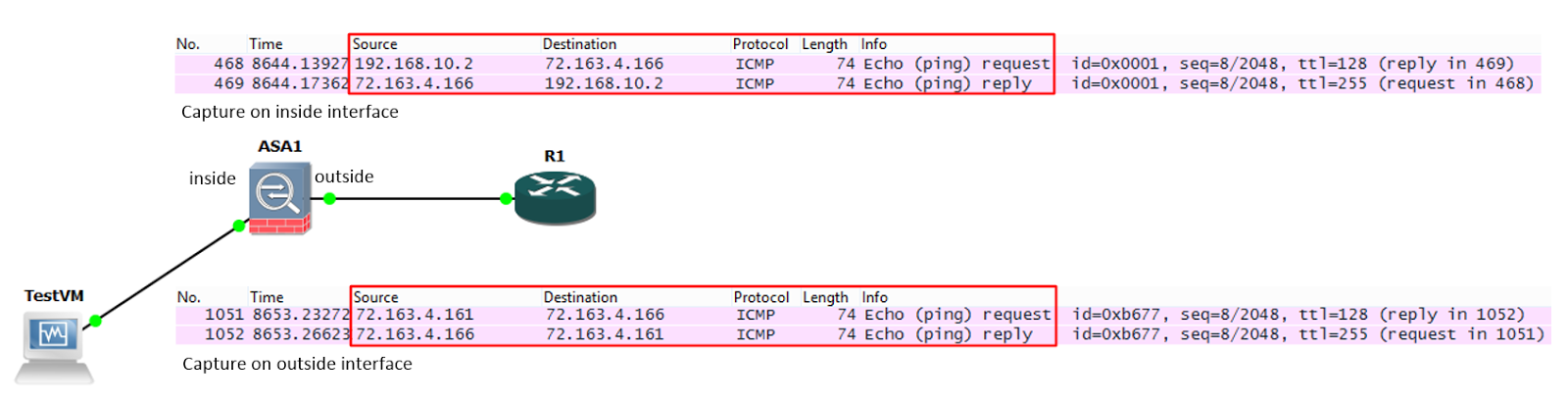
A ping is sent from TestVM (192.168.10.2) to R1 (72.163.4.166). In this example, R1 is on the internet, so the ASA cannot route the private address of 192.168.10.2 to R1. It must NAT the packet.
We can see this happen in the Wireshark captures below:
What is NAT?
I'll start with the basics. NAT stands for network address translation. It translates the real IP address of a device to the mapped IP and vice versa.
Real IP: the actual IP address of the device generating the traffic (on the inside interface in the examples below)
Mapped IP: the IP address the ASA translates the real IP address to (on the outside interface in the examples below).
NAT is most often used to translate private RFC 1918 IP addresses to publicly routable IP addresses (there are other less common uses as well).
For example:
A ping is sent from TestVM (192.168.10.2) to R1 (72.163.4.166). In this example, R1 is on the internet, so the ASA cannot route the private address of 192.168.10.2 to R1. It must NAT the packet.
We can see this happen in the Wireshark captures below:
Saturday, March 22, 2014
ASA Hairpinning and TCP state bypass
So what is hairpinning, anyway? Hairpinning is when traffic received on an interface is immediately routed back out the same interface. If you visualize the packet flow, it looks something like a hairpin:

The command "same-security-traffic permit intra-interface" allows us to hairpin traffic on an ASA. The most common use case is allowing remote access VPN traffic to traverse a site to site VPN tunnel as shown in the diagram above.
However, since we have the ability to hairpin VPN traffic, it seems safe to assume that we can hairpin other traffic as well.
Let’s look at the following scenario:
Subscribe to:
Comments (Atom)